
OnlyFans gives subscribers almost no built-in way to compare pages, and ranking cards fill part of that gap. This guide explains how to read those cards field by field before you renew a subscription. The platform has no discovery feed or directory, so the numbers you see on third-party ranking sites carry real decision weight. BestOnlyFans treats the card as a renewal tool, not a shopping list, and that framing changes which fields matter most.
A ranking card is a small bundle of data: a price, a history of that price, a timestamp, and a few activity signals. Each element answers a different question. Together they tell you whether the page you are paying for still behaves the way it did when you subscribed.

Why Ranking Cards Exist at All
OnlyFans has no built-in discovery feed and no public directory of creators. Search inside the platform is limited to accounts you already know or links you already have. That gap is the entire reason third-party ranking sites exist.
These sites collect publicly visible signals, organise them into cards, and publish them as browsable lists. The card is a compression of information you could technically gather yourself by opening dozens of profiles one at a time.

The platform’s growth explains the volume problem. As more creators joined, manual comparison stopped being practical for the average subscriber. Cards became a shortcut, and like all shortcuts they trade completeness for speed.
Understanding that trade-off is the first step. A card does not tell you whether a page is good. It tells you whether the page is priced, updated, and indexed in a way that matches your expectations.
The Price History Column
The price history column is the most useful field on any card, and the one most subscribers skip. A single price tells you what you pay today. A price history tells you how the creator treats pricing over time.
Paid base subscriptions run from $4.99 at the minimum to $49.99 at the maximum. Most paid pages sit in the $4.99 to $15 band, with averages clustering around $5 to $10. Free pages set the price to $0 and earn through pay-per-view messages and tips instead.
One rule matters more than the rest: when a creator raises the base price, auto-renew stops. Your existing access continues until the paid period you already bought ends. That single mechanic is why price history deserves a careful look before renewal.

| Pattern | What It Suggests | Renewal Implication |
|---|---|---|
| Stable base price | Pricing is predictable over months | Low surprise risk at renewal |
| Rising base price | Creator is testing higher tiers | Check whether your access continues at the old rate |
| Promotional dip | First-month discount below $4.99 | Confirm what the standard rate returns to |
| Volatile swings | Frequent changes in both directions | Expect renewal terms to shift again |
Four signals are worth isolating in any price history column:
- A stable base price that holds across several months.
- Frequent hikes, especially small ones repeated at short intervals.
- Promotional dips, where a first month drops below the $4.99 floor.
- Sudden drops that may signal a change in posting volume or page direction.
Remember that promotional first months can legally sit below $4.99, for example a $3 first month. The base price may not. If a card shows a very low figure, check whether it is labelled as promotional or standard.
Activity Timestamps and What They Signal
Timestamps answer a different question: is anyone still home? A recent post date suggests an active page. A stale date suggests risk, especially if you are paying a monthly base price.
Activity signals are not the same as quality signals. A creator can post often and still produce material you do not want. But an inactive page removes even the option, which makes timestamps a reasonable filter rather than a verdict.
The steps below turn a timestamp into a usable judgement:
- Find the last post date shown on the card.
- Compare that date against today’s date.
- Check whether short gaps are routine for this page.
- Flag the card if gaps exceed two weeks without explanation.

Also note where the creator’s revenue comes from. Pay-per-view messages can unlock up to $50, paid chat commonly runs $3 to $5 per message, and tips can reach $100. A page with quiet posting but steady PPV traffic is not necessarily inactive.
Tip: check the timestamp on the card itself before you trust the timestamp inside it. A card generated six weeks ago can show a post date that is no longer the creator’s most recent one.
Data Freshness and Decay
Every ranking card has an age, and that age changes how much weight the numbers deserve. Freshness decay is not a flaw in the card. It is a property of any dataset built from public signals.
A card generated this week reflects roughly this week’s reality. A card generated three months ago reflects a page that may have changed price twice since. The fields do not expire at the same speed, so treat them differently.
| Card Age | Reliability | Action |
|---|---|---|
| One week old | High for price and activity | Use as-is for a renewal decision |
| One month old | Moderate, price may have moved | Cross-check against a second source |
| Three months old | Low, treat as historical only | Verify directly before renewing |
Price fields decay slowly because base prices usually change in steps rather than continuously. Activity fields decay faster because posting habits can shift within days. Treat the two with separate expiry assumptions.
A card older than a month is best read as context rather than fact. It still tells you the direction a page was heading, which is useful for comparison even when the exact figure is outdated.
Cross-Referencing Two Ranking Sites
Two ranking sites will sometimes show different prices for the same page. That is normal and rarely malicious. Collection windows, refresh schedules, and update rules differ between operators.
When you find a disagreement, work through it in order rather than picking the lower number:
- Note the exact size of the gap between the two figures.
- Check the generation timestamp on each card.
- Prefer the fresher card when the gap is small.
- Verify directly on the profile itself before renewing.
Small gaps usually come down to timing. A card captured last Tuesday may simply predate a price change made on Thursday. Large gaps deserve more suspicion and a direct check.
Where the difference is large, treat the profile page as the tiebreaker. The platform is the source of truth, and the card is only a summary of what the platform showed at some earlier moment.
Building a Renewal Checklist from Card Data
A renewal decision combines three inputs: price history, activity signals, and freshness. Reading them separately is useful; reading them together is what prevents a bad renewal.
Run this checklist before each renewal date:
- Confirm the base price is unchanged from what you last paid.
- Confirm activity is recent and gaps are routine.
- Note the PPV density if the page relies on unlock messages.
- Confirm the card you are reading is under a month old.
- Confirm no competing card contradicts the one you trust.

If any item fails, the sensible move is to check the profile directly rather than renew on assumption. This comparison method has been used in past coverage of subscription pricing to catch renewal surprises early, and it works the same way here.
One practical note on billing: a card verification hold of $0.10 is normal and refunded within days. That charge is separate from the subscription price and should never be read as a price change.
If a billing notice looks off, do not act on the link inside it. Unexpected alerts that imitate payment messages are a well-documented phishing scam pattern, so log in through the platform directly and check your payment history there.
Where BestOnlyFans Fits in the Workflow
BestOnlyFans is a ranking methodology brand, which makes it useful as one input rather than the only input. The card it produces is best treated as a cross-check against whatever else you already trust.
Three ways to fold it into a renewal routine:
- Compare price history across two cards before deciding.
- Read the methodology notes to see how often fields refresh.
- Cross-reference timestamps with a second ranking site.
For readers who want a longer walkthrough of how cards are compared in practice, the best onlyfans vlog format covers the same comparison process in video form and pairs well with this written method.

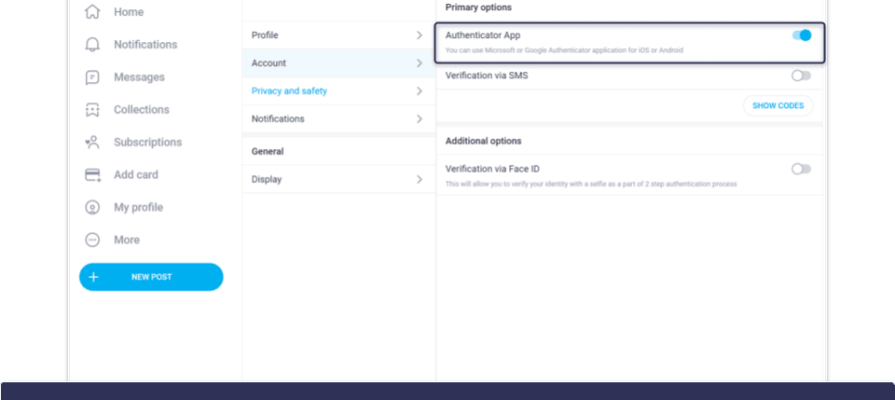
Security belongs in the same routine as pricing. Turn on two-step authentication and review both payment methods and account sessions from the settings screen. Treat any unexpected billing alert as a prompt to log in directly instead of clicking the link.
FAQ
How often do ranking cards update their price data?
Update frequency varies by operator. Many refresh on a weekly or monthly cycle, while others update on demand when a page changes. Always check the generation timestamp on the card itself, because the refresh schedule is only part of the story.
Can a ranking card show a price that no longer applies?
Yes. Any card can be outdated the moment a creator changes their price. This is why freshness matters more than the raw number. If the card is older than a month, confirm the current price directly on the profile before renewing.
Why do two ranking sites show different prices for the same page?
They collect data at different times and apply different update rules. A small gap usually means one card was generated before a price change. A large gap suggests one of the two is stale, and the profile page settles the question.
Should I rely on a ranking card or the page itself?
Use the card to shortlist and the page to confirm. Cards are efficient for comparison across many pages, but the profile is the only place where the current price and current activity are authoritative.