
OnlyFans free pages look like a zero-cost entry point, but verifying a $0 page before you follow is the only way to know what you are actually signing up for. The base subscription may cost nothing, yet the page can still expose your card to a verification hold, fill your feed with locked messages, and charge for replies. This guide sets out a repeatable verification routine built on observable signals rather than guesswork, so the follow decision is deliberate instead of reflexive. BestOnlyFans refreshes its rankings every month.
BestOnlyFans treats verification as a sequence of checks performed before the follow button is pressed, and that is the framing used throughout this article. Following a free page is not a neutral act; it is an open-ended attention commitment with variable cost exposure attached to it.

The Card Hold That Appears at Free Signup
The first surprise for new subscribers is that a $0 subscription still requires card details. OnlyFans uses a small authorization charge to confirm the card is valid and belongs to the person entering it. That charge is $0.10, not a subscription fee, and it is refunded within days.
The hold exists because the platform has no other way to verify a payment method at signup. A card that cannot authorize ten cents cannot authorize a pay-per-view unlock later. The verification protects both sides of the transaction, even though it looks like an unexplained charge on a statement for a day or two.
Two practical points follow. First, the $0.10 is separate from creator pricing and does not count toward a subscription. Second, if the hold does not clear within a few days, the issue sits with the card issuer or platform support, not the creator whose page you followed.
Check your statement a week after any free signup. A lingering $0.10 authorization usually means the card issuer has not released the hold, and a quick call to the bank clears it faster than waiting.

Why Following Is a Decision, Not a Reflex
Free pages differ from paid pages in where the money moves, not in whether money moves. A $0 base price shifts revenue into pay-per-view messages, tips, and paid chat.
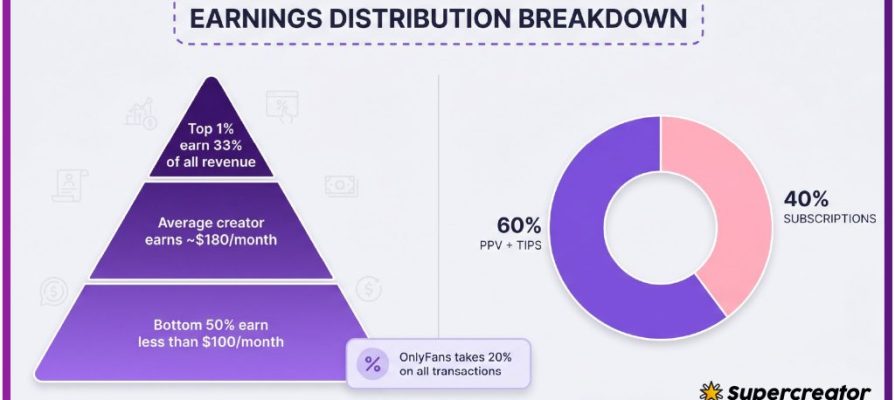
That structure means a free follow is really a decision about future exposure. The platform takes a 20% fee on everything and the creator keeps 80%, so every unlock, tip, and paid reply carries the same split. None of it happens unless the subscriber chooses it, but the prompts appear constantly in an active feed.
- PPV exposure: locked messages that can be unlocked for up to $50 each.
- Chat costs: paid replies that commonly run $3 to $5 per message.
- Tip norms: voluntary payments that can reach $100 and shape what gets posted.
- Time cost: an inactive follow still occupies feed space and attention.
Those are reasons to verify before following, because the cost profile of a page is visible in its feed long before the first purchase. A follow on a free page is cheap up front and potentially expensive later, and the feed itself tells you which outcome is more likely.

Signal One: Posting Consistency
Posting rhythm is the cheapest signal to read and one of the most reliable. A dormant page has a wall of old content with a recent gap that keeps widening.
Consistency matters because a free page earns through engagement, not through the subscription itself. A creator who posts regularly is present and responsive, and likely to keep the page running. Someone who stopped three months ago will not answer messages, will not publish new PPV, and will not justify the feed space.
| Posting pattern | What it suggests | Action |
|---|---|---|
| Daily or near-daily posts | Active page with an engaged creator | Proceed to the next checks |
| Weekly posts on a stable day | Maintained page with a lighter schedule | Follow if the content fits your interest |
| Sporadic bursts with long gaps | Uncertain commitment, possible seasonal use | Wait and recheck in two weeks |
| Dormant for months | Abandoned or migrated page | Skip it |
A useful habit is to scroll to the oldest visible posts and compare timestamps with the newest. The gap between them tells you more about reliability than any single post does.
If a page has been active for a year or more, the posting pattern is usually stable enough to predict. Younger pages are harder to read, so give them a second look before committing feed space.
Signal Two: PPV Density in the Feed
PPV density is the second observable signal, and it predicts spending pressure better than the subscription price ever could.
A page where most posts are locked turns the feed into a storefront.
- Scan the last twenty to thirty posts in the feed.
- Count how many are locked behind a pay-per-view price.
- Note the price points, remembering that unlocks can reach up to $50.
- Estimate how many you would realistically open in a week.

The number is often higher than expected on pages where locked posts outnumber open ones. A rough monthly figure built from the weekly estimate is enough to decide whether the page fits what you want to spend.
Signal Three: Paid Chat Visibility
Some pages publish their per-message rate in the bio or a pinned post. Others leave it unstated until a subscriber sends a message and receives a paid reply prompt.
What matters is disclosure: a page that states its rate lets you plan, while a page that hides it until the first reply forces a decision under pressure.
- Is the per-message price published anywhere visible?
- Does the stated rate fall in the common $3 to $5 range?
- Do replies require payment, or is basic chat open?
- Is there any stated refund or dispute posture for paid messages?
If the answers are unclear, send one short message and observe the response before committing further. One paid reply at $3 to $5 is a cheap way to learn how the page operates.

If a page turns out to be a poor fit, knowing where the unsubscribe control lives and how the billing period ends saves both time and money later.
Cross-Referencing With Ranking Data
On-platform signals only go so far, because OnlyFans has no built-in discovery feed or directory. Ranking sites exist to fill that gap by aggregating observable page data into comparable entries. BestOnlyFans is one such ranking methodology brand, and its entries combine activity recency with price signals rather than relying on a single metric.
It is most useful when it confirms what you already saw in the feed or flags something you missed, such as a price change or a long dormancy that a quick scroll would not reveal.
| Signal type | Source | Interpretation |
|---|---|---|
| Posting recency | On-platform feed | Direct evidence of current activity |
| PPV frequency | On-platform feed | Estimates weekly spending if you engage |
| Price history | External ranking sites | Shows whether pricing has moved recently |
| Category tags | External ranking sites | Helps filter pages that match your interest |
- Activity recency: when the page last posted, shown as a date or rough window.
- Price history: whether the base price or PPV range has changed over time.
- Category tags: the content categories a page is listed under.
- Status notes: whether an entry is a free page or a paid one, since the two behave differently.
When you compare a page’s own feed against a ranking entry, treat any disagreement as a reason to look closer. Price history is a common point of confusion, and a page that recently moved from free to paid will behave differently from one that never changed.
Payment fraud attempts are common across subscription platforms, so general awareness of how phishing works is useful background when any prompt asks for card details or login codes.

Turning on two-factor authentication in account settings adds a second check at login, which limits the damage if a password is ever reused or exposed elsewhere. A related point worth knowing: when a creator raises their subscription price, auto-renew stops, and existing access lasts until the paid period ends.
If your interest is specifically in low-cost regional listings, browsing a directory of free onlyfans scotland pages can show how different creators structure $0 subscriptions. Use it the same way as any other ranking source: as one input alongside the feed checks.
Building a Personal Follow Checklist
The individual signals are only useful once they are combined into a routine. A fixed sequence removes the impulse from the follow decision and makes comparisons between pages consistent.
- Confirm the page is actively posting by checking the newest post date.
- Note PPV density across the last twenty to thirty posts and estimate weekly unlocks.
- Check whether paid chat pricing is published and whether it sits near $3 to $5 per message.
- Review external ranking data for price history and category fit.
- Decide to follow or skip, and record the reason so future checks stay consistent.
Keep the notes short. Three lines per page, covering post date, PPV count, and chat rate, is enough to compare candidates side by side after a week. The point is to stop a decision that should take two minutes from turning into an accidental monthly cost.

One last check before following: confirm the page displays a subscription price of $0 or a paid base within the normal $4.99 to $49.99 range. Promotional first months can sit below $4.99, which is allowed, but a base price under $4.99 on a paid page is not how the platform works.
FAQ
Why does a $0 OnlyFans page ask for card details at signup?
The card is required to verify a payment method, not to charge the subscription. A $0.10 authorization is placed and then refunded, confirming the card works for any later pay-per-view unlock or tip.
How long does the $0.10 verification hold take to be refunded?
The hold is typically refunded within days. If it remains longer than that, the delay is usually on the card issuer’s side and a call to the bank resolves it.
What PPV density level suggests a free page will be expensive?
When most posts in the recent feed are locked with price points that can reach $50, weekly spending adds up quickly.
Is a free page with sporadic posting worth following?
Usually not immediately. Sporadic posting suggests uncertain commitment, so recheck the page in two weeks. If the gap has widened, skip it and put the attention elsewhere.